Great Article on CE Pro Today:
Tuesday, July 20, 2010


Tuesday, July 13, 2010
Connecting a Camcorder with a DV connector to a Computer
Support Q&A
I have a camcorder with a little "DV" connector on it. How do I connect it to my computer?
Does your computer have Firewire (IEEE-1394)? That is what you'll need.
The only way to add this to a computer that doesn't have it is by adding an internal PCI or PCI Express cards (for a Desktop) or a PC Card or Express card (for a laptop).
Please see here:
Firewire Cards
If you have Firewire, you'll just need a cable.
The DV connector on a camcorder is always a "4-pin" Firewire connector. On a Desktop, the connector is typically a 6-pin Firewire connector, although new computers may have the 9-pin Firewire 800 connector.
Firewire Cables
Monday, July 12, 2010
Multitrack Tape to Computer Audio
Support Q&A
Question: What do I need to record mixdowns from my multitrack Tape recorder to my computer to burn DVD's or put on Myspace?
Recording from a Multitrack Tape recorder to a Computer for burning to CD's or uploading to the Internet.
Is your current sound card of good enough quality to capture the recordings from the Tape Deck, or do you need something better? Most built-in sound cards are pretty bad and will effect the distortion and noise levels of your recordings. Of coarse this is the least expensive way to get things connected and start recording.
Cables and adapters:
Most Multitrack Tape Recorders have XLR or 1/4" mixdown outputs, although some use RCA connectors in addition to, or instead.
Stereo 3.5mm to dual 1/4" cables
3.5mm to Stereo RCA cables
1/4" to RCA patch cables
If you were to get an upgrade audio interface, would you want to use USB, Firewire or an internal PCI card?
An internal PCI card is harder to install, of coarse but you get lots of sound quality per dollar. Firewire is usually considered second best, but not all computers have firewire, so that can be a problem. The only way to add firewire is with an internal card. USB audio interfaces can be USB 1.x or USB 2.0 compliant. The more I/O on the box the more you'll need the extra speed of a USB 2.0 device.
Examples of Audio Interfaces:
USB:
M-Audio Fast Track USB
M-Audio Mobile Pre USB
Firewire:
M-Audio FireWire Solo
M-Audio Firewire 410
Presonus FireStudio Mobile
PCI:
M-Audio Audiophile 2496
M-Audio Audiophile 192
All these interfaces come with "Light" versions of software that should handle any kind of basic recording from Stereo Sources like tape decks.
Most Multitrack Tape recorders also have pre-mix outputs for each channel. If you want to capture all of those tracks discreetly, so you can mix and manipulate tracks individually on the computer, then you need a more expensive audio interface with four or more Inputs and Outputs.
Note: The amount of Inputs and Outputs advertised for audio interfaces is very often confusing and misleading. Check to make sure the interface actually physically has the number of inputs and outputs of the actual type you need!
Question: What do I need to record mixdowns from my multitrack Tape recorder to my computer to burn DVD's or put on Myspace?
Recording from a Multitrack Tape recorder to a Computer for burning to CD's or uploading to the Internet.
Is your current sound card of good enough quality to capture the recordings from the Tape Deck, or do you need something better? Most built-in sound cards are pretty bad and will effect the distortion and noise levels of your recordings. Of coarse this is the least expensive way to get things connected and start recording.
Cables and adapters:
Most Multitrack Tape Recorders have XLR or 1/4" mixdown outputs, although some use RCA connectors in addition to, or instead.
Stereo 3.5mm to dual 1/4" cables
3.5mm to Stereo RCA cables
1/4" to RCA patch cables
If you were to get an upgrade audio interface, would you want to use USB, Firewire or an internal PCI card?
An internal PCI card is harder to install, of coarse but you get lots of sound quality per dollar. Firewire is usually considered second best, but not all computers have firewire, so that can be a problem. The only way to add firewire is with an internal card. USB audio interfaces can be USB 1.x or USB 2.0 compliant. The more I/O on the box the more you'll need the extra speed of a USB 2.0 device.
Examples of Audio Interfaces:
USB:
M-Audio Fast Track USB
M-Audio Mobile Pre USB
Firewire:
M-Audio FireWire Solo
M-Audio Firewire 410
Presonus FireStudio Mobile
PCI:
M-Audio Audiophile 2496
M-Audio Audiophile 192
All these interfaces come with "Light" versions of software that should handle any kind of basic recording from Stereo Sources like tape decks.
Most Multitrack Tape recorders also have pre-mix outputs for each channel. If you want to capture all of those tracks discreetly, so you can mix and manipulate tracks individually on the computer, then you need a more expensive audio interface with four or more Inputs and Outputs.
Note: The amount of Inputs and Outputs advertised for audio interfaces is very often confusing and misleading. Check to make sure the interface actually physically has the number of inputs and outputs of the actual type you need!
Wednesday, June 30, 2010
iPRO Link - New Pro series Cables for iPad, iPod or iPhone!
Introducing our new iPRO Link Series of iPad, iPod and iPhone cables
The all new High Definition Audio Cable series from RAM Electronics!
The iPRO Link Line is a modular Professional line of cables with locking replaceable ends that allow you to switch between 3.5mm Stereo mini plug, Dual RCA, Dual 1/4" phone plugs, and dual XLR plugs. Perfect for connecting to Studio or PA mixing boards, DJ Gear, Home Recording Equipment, Guitar Amps, Radio/TV Station equipment, or your Car!
The iPRO Link series is the most versatile connection system for getting Audio out of your iPad/iPod/iPhone on the Planet!
Available in both USB Sync and charge versions and Standard version.

iPRO Link Standard
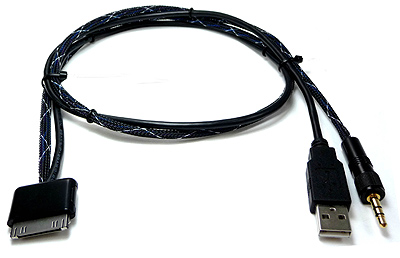
iPRO Link USB Sync and Charge
iPRO Link Adapters:


Wednesday, June 16, 2010
New HDMI Cables for 3D and Ethernet
In stock and shipping!
HDMI High Speed Cables with Ethernet are 3D Ready
 Our latest version of our acclaimed HDMI Elite Series cables are ready to connect all of your HDMI 1.4 devices. The Perfect choice for the new 3D HDTV's they are optimized for the high bandwidth necessary for 3D applications, and support all HDMI 1.4 features including Ethernet.
 HDMI signals are high frequency large bandwidth video signals. These signals have a characteristic of traveling on the surface of the wire. Silver plating is a better conductor, reduces copper surface oxidization and solders better to a gold contact, since they are both noble metals. Our HDMI cables will perform the same for many years from day one.
Features
• Solid Conductor for Best Conductivity
• Silver Plated for the Ultimate in High Frequency Conductivity and non-degradation over time
• Solid Conductor, Silver Plated on all conductors, not just TMDS pairs,
for the ultimate in perfectly "timed" cables.
• Category 2 high speed cable - supports 4k resolution.
• 3D Capable
• Supports 120, 240 frames per second refresh rate.
• Tested to 10.2 gigabit bandwidth.
• Dolby TrueHD , Deep Color and x.v Color spaces - giving billions of colors.
• Supports Audio return channel
• Supports Content type
• Supports Ethernet over HDMI
• Carefully manufactured to provide consistent Characteristic Impedance
for short or long cables.
• The connectors and cables are molded and jacketed for the best long range dependability, rather than appearance.
• High quality Gold plating on all electrical contacts for long lasting reliability.
• Tested and certified for HDMI 1.4 compliance.
Monday, May 24, 2010
"Deal of the Day"
This week the "Deal of the Day" is a free HDMI cable with ALL wall mounts.
 Just choose your Wall Mount and order it and we'll also send you a free HDMI 1.3 High Speed Cable!

Friday, May 07, 2010
Connectivity Today RamElectronics.Net: MOTHERS' DAY RAFFLE
Connectivity Today RamElectronics.Net: MOTHERS' DAY RAFFLE
A commitment To Our Cause
At home or in the workplace change is a fact of life and how we choose to respond to it determines our personal and professional growth. We can't deny the fact that this disease is affecting one in eight women in the US alone. This our cause, this is RAM's cause, please participate. We need you.
I really believe that the depth of our passion and commitment determines the intensity of our involvment.
On the note I want to leave you with this poem....
Will
There is no chance, no destiny, no fate,
Can circumvent or hinder or control
The firm resolve of a determined soul.
Gifts count for nothing; will alone is great;
All things give way before it, soon or late.
What obstacle can stay the mighty force
Of the sea-seeking river in its course,
Or cause the ascending orb of day to wait?
Each well-born must win what it deserves.
Let the fool prate of luck. The fortunate
Is he whose earnest purpose never swerves,
Whose slightest action or inaction serves
The one great aim. Why, even Death stands still,
And waits an hour sometimes for such a will.
Ella Wheeler
American Poet
1850-1919
A passionate and committed member of the RAM team.
A commitment To Our Cause
At home or in the workplace change is a fact of life and how we choose to respond to it determines our personal and professional growth. We can't deny the fact that this disease is affecting one in eight women in the US alone. This our cause, this is RAM's cause, please participate. We need you.
I really believe that the depth of our passion and commitment determines the intensity of our involvment.
On the note I want to leave you with this poem....
Will
There is no chance, no destiny, no fate,
Can circumvent or hinder or control
The firm resolve of a determined soul.
Gifts count for nothing; will alone is great;
All things give way before it, soon or late.
What obstacle can stay the mighty force
Of the sea-seeking river in its course,
Or cause the ascending orb of day to wait?
Each well-born must win what it deserves.
Let the fool prate of luck. The fortunate
Is he whose earnest purpose never swerves,
Whose slightest action or inaction serves
The one great aim. Why, even Death stands still,
And waits an hour sometimes for such a will.
Ella Wheeler
American Poet
1850-1919
A passionate and committed member of the RAM team.
Thursday, May 06, 2010
Audioengine P4 speaker review
A tiny little Monster

Unlike the most well known Audioengine speakers, the P4's are not self powered speakers. They are tiny, 9" high, 5-1/2" wide and 6-1/2" deep. They are two way and have a 4" Kevlar Mid/Woofer and 3/4" silk dome tweeter. That's tiny for "Real" speakers, large for computer speakers and about average for those "home theater in a box" speakers. Since they aren't self-powered it would seem their market is NOT computer speakers, but rather replacements for "home theater in a box" speakers, or stereo or home theater speakers for smaller rooms. You could get 4 of them and a subwoofer and have a nice surround sound system for small rooms. Unfortunately, you can't buy a single speaker to use as a center. So other than the above conjecture, your ideas are as good as mine as to what market they are selling to. They are available in Black, White and a very nice Bamboo finish.
The Test Setup
I am an anomally, a weirdo, a freekazoid, a wackjob, a "dork" (per Val) so I use small, "high end" mini monitors (Reference 3A Dulcet's) and a Denon AVR-3805 Receiver in my computer setup. For most people, that would seem, cough, cough, a wee bit excessive. The Dulcet's go for about $1799 new, the 3805 went for about $1200. Not exactly typical for a computer setup, but I LOVE my music, and spend a LOT of time on the computer, so hey, I'm a happy dork.
The rest of the test setup is iTunes using music recorded as "wav" files (not MP3 or Apple "lossless") a Presonus Firestudio mobile Audio interface, and, if you must know, Jon Risch style 89259 speaker cables with WBT connectors.
So, I just unplugged the Dulcet's and plugged in the P4's and started listening. I did no measurements on these speakers.
Listening
Well, there is a lot of detail going on here. They sound very clear and natural. The silk dome tweeter is very nice, detailed, smooth and non-fatiguing. The 4" kevlar mid/woofer is also very good, detailed and smooth. The combination is excellent. While there seems to be a "detail" peak in the 4KHz range, most "audiophiles" like that, although clarinets and alto saxes could get a bit annoying with some recordings. Just a little bit too much upper/mid treble peakiness for me. It could just be the recordings themselves, though. Of course this is compared to much more expensive speakers, anyway. Compared to similar speakers? Yes, you can get "smoother" speakers, but in this price range, you will most likely lose something. For the most part Sax and strings were gorgeous. It may just be a slight crossover imperfection (most speakers have those, right?) or maybe something to do with the recessed tweeter. I assume the tweeter is recessed in a "horn like" fashion for better sensitivity rating, but dispersion and imaging would have improved with flush mounting. A 3/4" tweeter could have dispersed very well at a much higher frequency than the usual 1" tweeter which tends to "crash" dispersion wise at about 10KHz. Flush mounted, this tweeter with the nice rounded edges of the cabinet could have even better imaging. Of course, that's a pet peive of mine with todays speakers, that I tend to over emphasize. (see the "dork" reference above) Overall, the imaging was really, really good. Far better than most speakers anywhere nearr this price.
The bass is very well defined and seems to get much lower than possible for speakers this size. I had assumed before that the Audioengine powered speakers did a lot of eq to get the bass response that they have, but perhaps it's just excellent speaker design? The bass output they do have is quite wonderful. They certainly seem relatively flat in the bass, no big 100-120Hz hump like you hear in most lesser speakers of this size and price. They also get down well under 100Hz with great effect and cleanliness, which is pretty rare for drivers this size. They are rated as 58Hz-22KHz, and that is quite believevable. The Caveat is that speakers this size cannot deliver low bass into any room that is not very small. As near field monitors you can hear their lower notes, but in a normal sized room, they quite simply can't properly "load the room". So, don't expect low frequency bass if you have anything but a small room. Sensitivity is 88dB (2.83v@1m) which is a little bit low, so they do take a bit of power to drive them. On the other hand, they are very small, so they get a bit compressed sounding if you push them too loud in "full range" speaker mode. String bass sounded extremely nice and believable without a sub woofer. In a larger room, I'd cross them over at 80Hz, to a nice sub, or even 100Hz, if you need higher volume levels. Of course, you can only get so loud with these "micro monitors" even with a big Sub. The drivers are not made for "concert" sound levels, and will dynamicly compress and get a bit strident if pushed too hard. If you need loud volumes, you need bigger speakers. If you have a large room, you should get bigger speakers. I did get the chance to listen to these with and without a subwoofer in a reasonably large room, and they sounded quite good. Cranking things up to extremes didn't work so well, they just couldn't get extremely loud, but at reasonable volumes, they will work quite well as fronts or rears.
Conclusion
At a $249 price, these speakers deliver a lot. Lots of other good brand name speakers deliver more loudness and more bass at this price, but very, very few deliver the intriguing mix of "high end" detail, and real, organic listenability that these offer. They are not speakers for AC/DC fans, but if you like to hear music that sounds as "real" as possible at reasonable levels in a smaller sized room, they are really quite good at that. Used as up close, "near field monitors" like in my setup, they are really very good. I already have way too many speakers in this place, but I don't see sending these back. The more I listen to them with different listening material, the more I like them. They were never on my "bucket list" like LS3/5A's or WATT/PUPPY's or other high end wonders, but they are a fun little speaker that sounds pretty amazing in the right way for me, "el dorko".
*Note: Ram Electronics is a Reseller for Audioengine speakers. The speakers were purchased after being returned rather than on loan for review. The author says he will cuss out anyone suggesting he is being impartial. But, then he's a wimp so don't worry about it... Have at it!
MOTHERS' DAY RAFFLE

PLEASE PURCHASE A FEW TICKETS FOR OUR MOTHERS' DAY RAFFLE.
PROCEED TO BENEFIT OUR ANNUAL CANCER SOCIETY FUND RAISING.
RAFFLE WILL TAKE PLACE ON FRIDAY MAY 7TH.
Wednesday, May 05, 2010
Shipping to Canada
Are you new to online shopping? If you are on the Canadian side of the border and thinking of shopping on U.S. sites, hidden costs may catch you by surprise. There are things you should check before you place the order:
First of all, check if the site offers international shipping or at least shipping to Canada. There is nothing more irritating than going through an e-commerce site, filling your shopping cart and then discovering that the vendor does not ship outside the US. RAM offers international shipping including Canada, Mexico and Puerto Rico.
Secondly, check the company's terms and condition for international shipping, returns and exchanges. The shipping charges or method of shipments (UPS or USPS) are not the total shipping cost you have to pay to get the product across the border. Import duties, taxes, and brokerage fees are not included in the product price or shipping cost. These fees are the responsibility of the recipients as the company only charges for transportation and it will be collected upon delivery of the package. If you have specific questions about Canadian customs and duties, please contact a Canada Border Services Agency office or the Border Information Service.
You can also check UPS and USPS for import duties, taxes and brokerage fees. RAM offers two methods of shipping USPS and UPS. RAM also offers 30 days return and exchange policy if you are not completely satisfied with the product.
Be sure to follow these basic steps to avoid any frustration and have a pleasant shopping experience.
First of all, check if the site offers international shipping or at least shipping to Canada. There is nothing more irritating than going through an e-commerce site, filling your shopping cart and then discovering that the vendor does not ship outside the US. RAM offers international shipping including Canada, Mexico and Puerto Rico.
Secondly, check the company's terms and condition for international shipping, returns and exchanges. The shipping charges or method of shipments (UPS or USPS) are not the total shipping cost you have to pay to get the product across the border. Import duties, taxes, and brokerage fees are not included in the product price or shipping cost. These fees are the responsibility of the recipients as the company only charges for transportation and it will be collected upon delivery of the package. If you have specific questions about Canadian customs and duties, please contact a Canada Border Services Agency office or the Border Information Service.
You can also check UPS and USPS for import duties, taxes and brokerage fees. RAM offers two methods of shipping USPS and UPS. RAM also offers 30 days return and exchange policy if you are not completely satisfied with the product.
Be sure to follow these basic steps to avoid any frustration and have a pleasant shopping experience.
Monday, May 03, 2010
What Women Want
Welcome to the great post-feminist age, where it’s OK to admit that men and women are different. In fact, they’re from separate planets. Here’s the problem: even if you buy into the whole Mars/Venus thing, nobody has explained how to get a Venusian into a Martian cave. (Or how to get her to approve buying a home theater system for the cave. Or for the cave’s living room.)
According to Hollywood’s market research, women are the primary decision makers for choosing which movies a couple sees. Similarly, women are the primary decision makers when renting home videos. On average, women spend more time per week watching prerecorded movies than men. And, while I don’t have poll numbers to back this up, I’ve found women to be extremely passionate about movies because I am a women – they bet in office Oscar pools, wear fashions set by movie stars, and memorize lines from The Princess Bride.
Women ought to be natural home theater fans. Right ?!?!?!
Obviously, something is keeping them back.
That "something" statistically is generally the following three (3) things:
1) Money :
However, just because a home theater is not a necessity does not make it difficult to justify. With the latest digital technology, your home can provide a better picture and superior sound to what you get at an average movie theater. But you don’t have to leave the house – or even put on shoes. You can pause the movie to go to the bathroom. There are no noisy teenagers ruining the experience (unless they happen to be yours). You can turn down the volume. You can turn UP the volume. You can watch material the SuperMegaPlex would never show.
2) Technology :
Whoa – hold on. When I said, “With the latest digital technology, your home can provide a better picture and superior sound to what you get at an average movie theater,” that’s it. That’s all the information most woman want about the technology. That the experience it will provide will likely be better than a typical movie theater. Women are not interested in technology per se, they’re interested in the benefits it provides.
3) Space :
In conclusion, stop talking about the technology, start talking about immersion. If you primarily want a big screen TV for football, consider how a woman might appreciate the larger screen size for watching movies.
Finally, don’t demo the technology! Most demo material used to show off home theater equipment alternates between explosions, car chases, explosions, science fiction, and explosions. Where's the Tom Cruise? Romantic comedies? It’s true that Tom Cruise saying "You complete me" while "Secret Garden" plays on the soundtrack (in Jerry Maguire) doesn't show off the subwoofer as well as meteors taking out Paris (in Armageddon) – but it is an impressive, immersive experience. The Titanic DVD isn’t enhanced for widescreen displays – but it’s a powerful, popular film.
So maybe..... by thinking about "what women want" ... you may actually get "what you want" ...
=)
Thursday, April 29, 2010
HDMI 1.4
I have received a lot of questions about HDMI 1.4, so I wanted to give a little information. HDMI is the newest version of HDMI that offers more benefits than the previous HDMI 1.3.
First, the newest version of the HDMI has the added ethernet channel. This allows for streaming from ethernet capable devices to the display. It will send the information at 100 mbps.
Second, it will support the new 3D tvs and players. Also, HDMI 1.4 supports resolutions into the 4Kx2K. Or put into regular numbers, 3840x2160 and 4096x2160. This resolution is much better than the 1080p that is very popular now. However, there are no sources that will output that resolution at the moment. On that note, it is capable of better color space. This will allow for more lifelike colors and deeper blacks.
Lastly, HDMI 1.4 has been feild tested against vibration, noise, weather, and heat. Therefore, it will be suitable to put into the car! This will allow for higher resolution monitors and screens.
Basically, HDMI 1.4 is better than the last versions of HDMI. At least for now. Given the previous versions only lasting 6 months before something new rolled out, we will have to see. But for now, I think that HDMI 1.4 is a safe bet and will continue to be used for a long time.
First, the newest version of the HDMI has the added ethernet channel. This allows for streaming from ethernet capable devices to the display. It will send the information at 100 mbps.
Second, it will support the new 3D tvs and players. Also, HDMI 1.4 supports resolutions into the 4Kx2K. Or put into regular numbers, 3840x2160 and 4096x2160. This resolution is much better than the 1080p that is very popular now. However, there are no sources that will output that resolution at the moment. On that note, it is capable of better color space. This will allow for more lifelike colors and deeper blacks.
Lastly, HDMI 1.4 has been feild tested against vibration, noise, weather, and heat. Therefore, it will be suitable to put into the car! This will allow for higher resolution monitors and screens.
Basically, HDMI 1.4 is better than the last versions of HDMI. At least for now. Given the previous versions only lasting 6 months before something new rolled out, we will have to see. But for now, I think that HDMI 1.4 is a safe bet and will continue to be used for a long time.
Tuesday, April 27, 2010
HDTV Video Connections or why is everyone fat on My TV?
Part III
The Final Frontier
A few light years ago, we started to explain some of the small nuisances associated with HDTV, resolutions, scaling, connections, and a plethora of raw details that were fascinating and others plain boring. It is time to close this topic and move on to more interesting subjects, ie HDTV tuning and recording on your PC using Vista Media Center and Windows 7. You just can’t wait, neither can we, but let’s finish the business at hand.
Everyone is fat on your HDTV and disproportionately wide because you are not viewing a high definition program formatted properly. Your TV or set-top cable/satellite box is taking a standard definition 4:3 ratio signal and stretching it across your 16:9 ratio HDTV’s screen. This is distorting the picture content and one of the more heinous problems when viewing SDTV(Standard Definition) on a HDTV(High Definition) systems. Sounds like a bunch of perversion or STD’s(set-top diseases, got you!), it is. Some of you are paying for HDTV program and only viewing SDTV. How do your cure this without killing the HDTV? It is sometimes easy and some times impossible.
Let’s dive into our most recent example. Comcast Cable broadcast their HDTV channels in the 200-channel range. SDTV is below the 200 range and some are above 300. All my HDTV channels, when not broadcasting HDTV programs are proportional and correctly formatted to 4:3 with black side panels, as they should, since this is a digital HDTV signal. When tuned below the 200 channel all the pictures stretch to fit the screen. This is one of those aggravating big brother cable company problems, which you have to tolerate. The HDTV then actives the scaling that stretches a SDTV 4:3 picture to fit the 16:9 screen.
How do you fix this problem? On some set-top box, you can set the box to output 480i, 480p, 1080i or 720p. This sound like a good idea, but don’t. Setup the box to output the native channel resolution or pass-thru. The electronics in most new HDTV’s are far superior to the set-top box and does a better scaling job then any set-top box. If the picture has to stretch to fill, it will be a better stretch. ESPN, ABC and Fox HDTV broadcast fast action sports and use 720p, for better image performance. You will want these channels in the native 720p. How can you tell if your set-top is native? When you changing channels you will get a slight hesitation as the HDTV’s scaling adjust. You can also press display on your TV’s remote control to check the channels resolution. If any of your 720p channels are at a different resolution other than 720p, your set-top is scaling. Contact your HDTV provider and get them to set-up for pass-.thru.
One other thought on the situation, if you are not using a component video or HDMI connection from your set-top box or DVD player you can not get a high-definition picture. See our connection guide on all the types of video connection options available.
http://www.ramelectronics.net/howto-av.ep
Finally, with all the programming available online many are connecting their PC’s to the HDTV. This is simple if you have VGA or HDMI outputs from your computer and matching VGA or HDMI connections on your HDTV. A cable connection will be sufficient. However, if the outputs and inputs are different types or resolutions, there are a number of converter options available for matching the two, but we will save that for another discussion.
The Final Frontier
A few light years ago, we started to explain some of the small nuisances associated with HDTV, resolutions, scaling, connections, and a plethora of raw details that were fascinating and others plain boring. It is time to close this topic and move on to more interesting subjects, ie HDTV tuning and recording on your PC using Vista Media Center and Windows 7. You just can’t wait, neither can we, but let’s finish the business at hand.
Everyone is fat on your HDTV and disproportionately wide because you are not viewing a high definition program formatted properly. Your TV or set-top cable/satellite box is taking a standard definition 4:3 ratio signal and stretching it across your 16:9 ratio HDTV’s screen. This is distorting the picture content and one of the more heinous problems when viewing SDTV(Standard Definition) on a HDTV(High Definition) systems. Sounds like a bunch of perversion or STD’s(set-top diseases, got you!), it is. Some of you are paying for HDTV program and only viewing SDTV. How do your cure this without killing the HDTV? It is sometimes easy and some times impossible.
Let’s dive into our most recent example. Comcast Cable broadcast their HDTV channels in the 200-channel range. SDTV is below the 200 range and some are above 300. All my HDTV channels, when not broadcasting HDTV programs are proportional and correctly formatted to 4:3 with black side panels, as they should, since this is a digital HDTV signal. When tuned below the 200 channel all the pictures stretch to fit the screen. This is one of those aggravating big brother cable company problems, which you have to tolerate. The HDTV then actives the scaling that stretches a SDTV 4:3 picture to fit the 16:9 screen.
How do you fix this problem? On some set-top box, you can set the box to output 480i, 480p, 1080i or 720p. This sound like a good idea, but don’t. Setup the box to output the native channel resolution or pass-thru. The electronics in most new HDTV’s are far superior to the set-top box and does a better scaling job then any set-top box. If the picture has to stretch to fill, it will be a better stretch. ESPN, ABC and Fox HDTV broadcast fast action sports and use 720p, for better image performance. You will want these channels in the native 720p. How can you tell if your set-top is native? When you changing channels you will get a slight hesitation as the HDTV’s scaling adjust. You can also press display on your TV’s remote control to check the channels resolution. If any of your 720p channels are at a different resolution other than 720p, your set-top is scaling. Contact your HDTV provider and get them to set-up for pass-.thru.
One other thought on the situation, if you are not using a component video or HDMI connection from your set-top box or DVD player you can not get a high-definition picture. See our connection guide on all the types of video connection options available.
http://www.ramelectronics.net/howto-av.ep
Finally, with all the programming available online many are connecting their PC’s to the HDTV. This is simple if you have VGA or HDMI outputs from your computer and matching VGA or HDMI connections on your HDTV. A cable connection will be sufficient. However, if the outputs and inputs are different types or resolutions, there are a number of converter options available for matching the two, but we will save that for another discussion.
Monday, April 26, 2010
Reseller's / Installers
Happy Monday
Just wanted to take the time to introduce to myself. My name is Valerie and I am a customer service rep at RAM Electronics who works closely with our Reseller's and Installers - locally (Cinnaminson, NJ) and nationwide.
We offer:
and fill out our application and send over with a copy of your resale certificate to my attention via fax or email.
Please do not hesitate to contact me for any or all of your connectivity needs.
Thanks for taking the time to read - happy blogging
Email: valerie@ramelectronics.net
Fax: 856-786-2244
Just wanted to take the time to introduce to myself. My name is Valerie and I am a customer service rep at RAM Electronics who works closely with our Reseller's and Installers - locally (Cinnaminson, NJ) and nationwide.
We offer:
- Discounted Dealer/Installer Pricing
- Blind Drop shipping to site
- Full Online Account Management and/or phone purchase orders to approve term accounts
- Order History
- Custom Cables,Wall Plates and Cable Harnesses made to your Specs with deep Discounts
- Design assistance and technical support
and fill out our application and send over with a copy of your resale certificate to my attention via fax or email.
Please do not hesitate to contact me for any or all of your connectivity needs.
Thanks for taking the time to read - happy blogging
Email: valerie@ramelectronics.net
Fax: 856-786-2244
audioengine W2
I had the opportunity to play with Audioengine W2 Premium Wireless Adapter this weekend. This device allows you to use your iPod/iPhone for total wireless music control. The beauty of this device is in its ease of use and the fantastic sound quality. The setup couldn't be simpler. You plug the sender unit into your ipod/iphone, then plug the receiver into the audio inputs on your music system then turn on your ipod/iphone. Within 30 seconds the sender and receiver find each other and you can now choose your song or playlist.
The W2 uses Wi-Fi technology to deliver the signal without any dropouts, static or interference. The sound quality was as good as when my iPod/iphone was connected to my system with cables, but I had the advantage of being able to wander about my living room without being tethered to my stereo system. I was even able to sit on my front porch and change my music selections! The advertised range for the W2 is 30ft, but this may vary depending on walls and other variables. Although the W2 does not advertise that it will work with the iPhone, I had not problems with the setup except for the annoying warning that "this device is not designed to work with the iPhone".
My overall impression for the Audioengine W2 Premium Wireless Adapter was excellent. If you're looking for a device that will allow you to play your iPod or iPhone through your music system wirelessly, this is the device to get.
The W2 uses Wi-Fi technology to deliver the signal without any dropouts, static or interference. The sound quality was as good as when my iPod/iphone was connected to my system with cables, but I had the advantage of being able to wander about my living room without being tethered to my stereo system. I was even able to sit on my front porch and change my music selections! The advertised range for the W2 is 30ft, but this may vary depending on walls and other variables. Although the W2 does not advertise that it will work with the iPhone, I had not problems with the setup except for the annoying warning that "this device is not designed to work with the iPhone".
My overall impression for the Audioengine W2 Premium Wireless Adapter was excellent. If you're looking for a device that will allow you to play your iPod or iPhone through your music system wirelessly, this is the device to get.
Subscribe to:
Posts (Atom)